
Choosing an intraoral scanner is not simply a matter of finding the fastest device or the model with the longest specification sheet. The right scanner should fit the cases your clinic performs, your existing digital workflow, your lab relationships, your computer environment, your team’s preferred way of working, and the level of training and support you expect after purchase.
For most dental clinics, the best way to choose is to start with workflow requirements rather than brand names. Define what you need the scanner to do, identify the features that are truly essential, eliminate systems that do not fit those requirements, and then test the strongest candidates in a real-world demonstration.
If you are already comparing options, you can also browse our intraoral scanners in Canada or review our Best Intraoral Scanner guide.
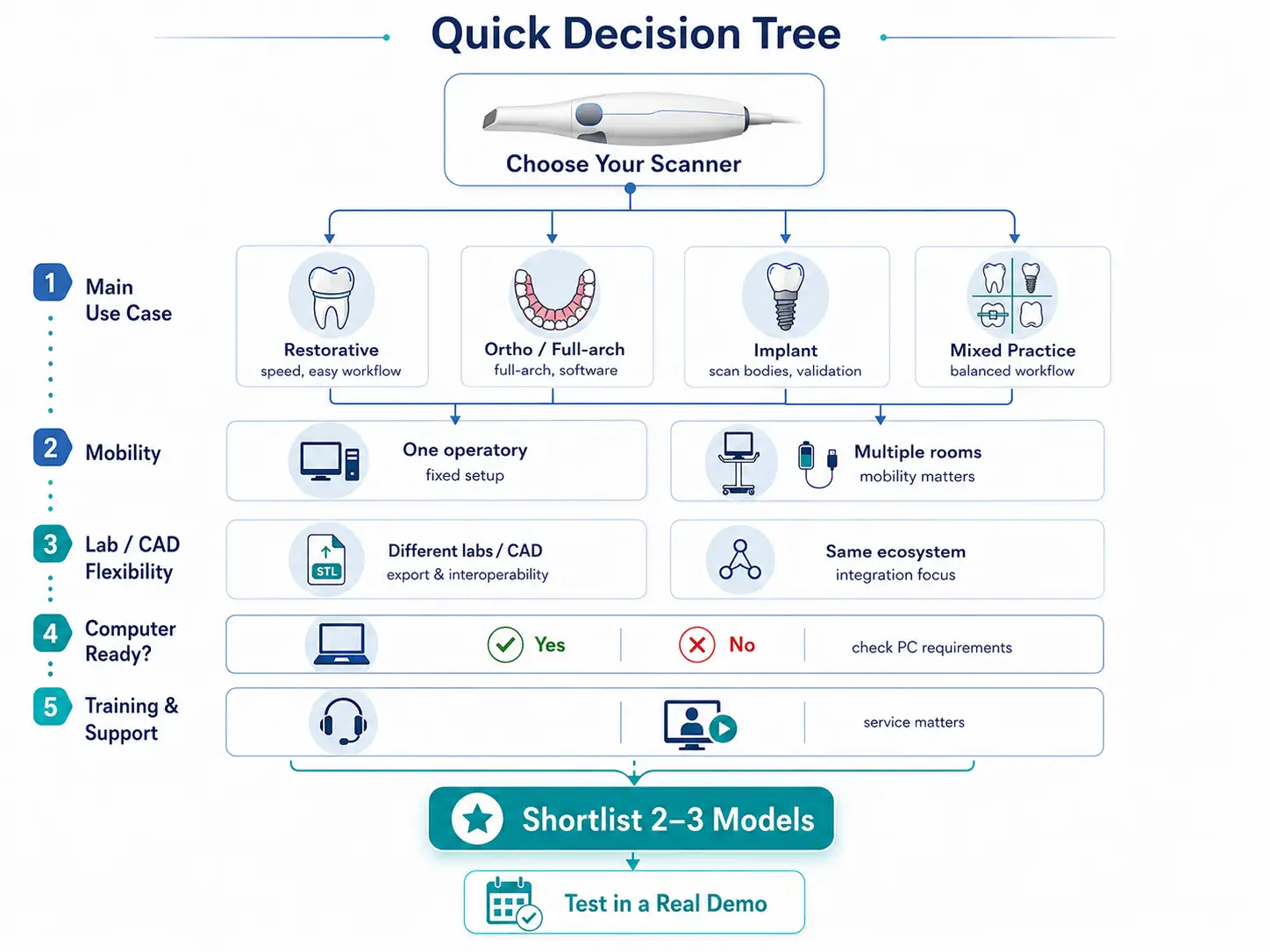
Quick Decision Tree: Which Intraoral Scanner Fits Your Clinic?
Before comparing individual models, work through these questions.
1. What types of cases will you scan most often?
Mostly crowns, bridges, and routine restorative cases?
Prioritize an efficient everyday workflow, ease of use, predictable scanning, straightforward file handling, and compatibility with your restorative process.
A large amount of orthodontic or full-arch scanning?
Pay more attention to full-arch workflow, software tools, data management, and the way scans are transferred into your orthodontic workflow.
Implant cases?
Check the workflow for scan bodies, restorative partners, laboratory communication, and any case-specific accuracy or validation requirements.
A mixture of different procedures?
Look for a balanced system that works well across the majority of your clinic’s normal cases rather than choosing a device around one rarely used feature.
2. Will the scanner stay in one operatory?
Yes: a fixed workstation workflow may be perfectly practical.
No: if the scanner needs to move between rooms, mobility, cable management, battery workflow, computer setup, and how quickly the system can be moved become more important.
3. Do you need to send scans to different labs or CAD systems?
Yes: investigate file export, supported formats, software permissions, and interoperability before purchasing.
No: if most cases remain within a specific digital ecosystem, integration and workflow convenience may matter more than maximum flexibility.
4. Can your current computer support the scanner?
If you are unsure, treat the computer as part of the purchasing decision. A scanner that requires a new workstation changes the true cost of implementation.
5. How important are training and after-sales support?
For clinics adopting intraoral scanning for the first time, or clinics where downtime would disrupt a large number of appointments, training and support can be as important as the scanner hardware itself.
If several models still fit after these questions, the next step should be a controlled demo using the same types of cases you expect to scan in your clinic.
here is a video to help you Buying an Intraoral Scanner:
Start With Your Clinical Use Cases
A scanner should be evaluated according to the work it will actually perform.
A feature can look impressive in a product demonstration and still have little value if your team rarely uses it. Conversely, a seemingly minor workflow feature can become very important when the scanner is used several times every day.
Start by listing your three most common digital scanning use cases.
General Restorative Dentistry
For crowns, bridges, and routine restorative work, focus on the complete scanning workflow rather than one isolated performance metric.
Consider:
- how quickly the team can start and complete a case;
- how easy it is to rescan or correct an area;
- how cases are organized in the software;
- how the scan is transferred to the laboratory or restorative workflow;
- whether the scanner fits comfortably into normal appointment flow;
- whether multiple team members can learn the process consistently.
For a busy restorative clinic, workflow simplicity and repeatability may matter more than advanced features that are rarely used.
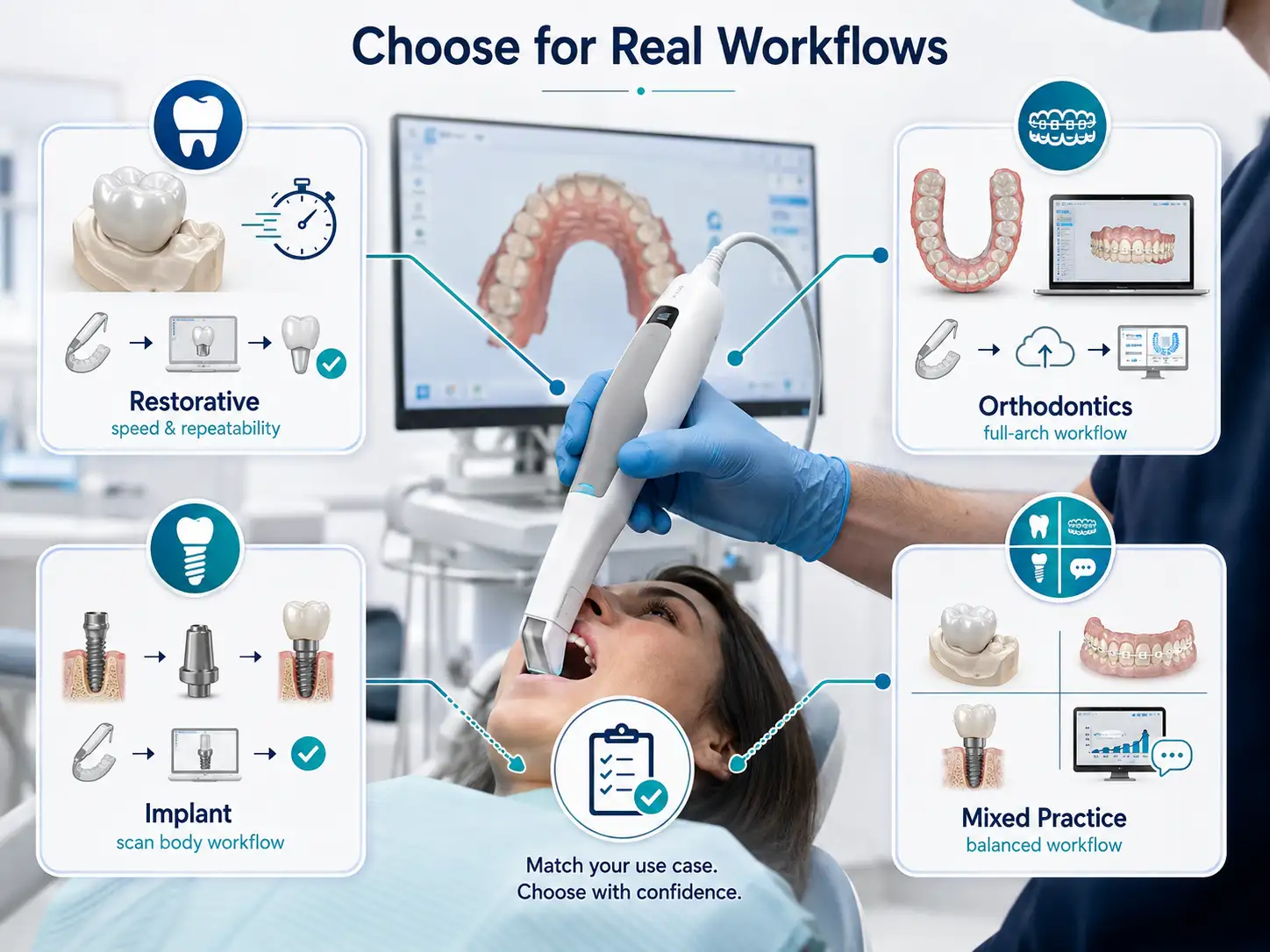
Orthodontic Workflows
Orthodontic scanning can place different demands on a system because full-arch data, repeated scans, case records, and downstream software may all play a role.
Ask:
- How is a full-arch case managed?
- How are files transferred into the orthodontic workflow?
- Can cases be easily organized and retrieved later?
- Does your intended software or laboratory accept the scanner’s output?
- Will the workflow still be efficient if scanning volume increases?
If orthodontics is a major part of the practice, test an actual orthodontic-style case during the demo rather than relying only on a short quadrant scan.
Implant Dentistry
Implant scanning should be evaluated according to the type and complexity of implant work performed by the clinic.
Single-unit implant workflows may have different requirements from multiple implants or more advanced full-arch cases.
Before purchasing, clarify:
- your normal implant indications;
- the scan body workflow;
- how the scan is sent to the laboratory or restorative platform;
- which software and file formats are involved;
- whether the manufacturer or workflow provider supports the intended application.
Do not assume that because a scanner performs well for routine restorative cases, every advanced implant workflow will be identical.
Mixed General Practice
Many clinics need an intraoral scanner for a combination of restorative, orthodontic, implant, diagnostic, and communication tasks.
In this situation, avoid choosing based on one extreme use case unless that use case is commercially or clinically important to your practice.
The goal is usually to find the scanner that creates the fewest workflow compromises across the procedures you perform most often.
The Most Important Criteria When Choosing an Intraoral Scanner
Once you understand your use cases, compare scanners using a consistent set of decision criteria.
1. Clinical Workflow Comes First
Begin with the question:
What needs to happen from the moment scanning starts until the case reaches its next destination?
That destination may be:
- a dental laboratory;
- restorative design software;
- orthodontic software;
- an implant workflow;
- an internal clinic system;
- or another part of a digital dentistry workflow.
Map the full process.
A scanner that looks excellent during capture can still create friction if case setup, export, lab transfer, software login, file organization, or downstream integration is difficult for your team.
Before comparing products, document:
- who will use the scanner;
- where it will be used;
- how often it will be used;
- where the data needs to go;
- which software or laboratory receives the data;
- what happens after the scan is complete.
This turns the purchase from a feature comparison into a workflow decision.
2. Evaluate Accuracy in the Context of Your Cases
Accuracy is important, but “Which scanner is the most accurate?” is usually too broad a question to guide a purchase by itself.
The more useful question is:
Is this scanner appropriate for the types of cases we intend to perform, and what evidence supports that use?
When reviewing accuracy claims, distinguish between:
- manufacturer specifications;
- defined test conditions;
- clinical or laboratory evidence;
- the type and length of the scan;
- the application being evaluated.
Terms such as accuracy, trueness, precision, and repeatability should not automatically be treated as interchangeable.
If accuracy is a major part of your decision, review the evidence in the context of your intended workflow rather than choosing a scanner because of a single number or marketing claim.
For a deeper discussion, see our Intraoral Scanner Accuracy guide.
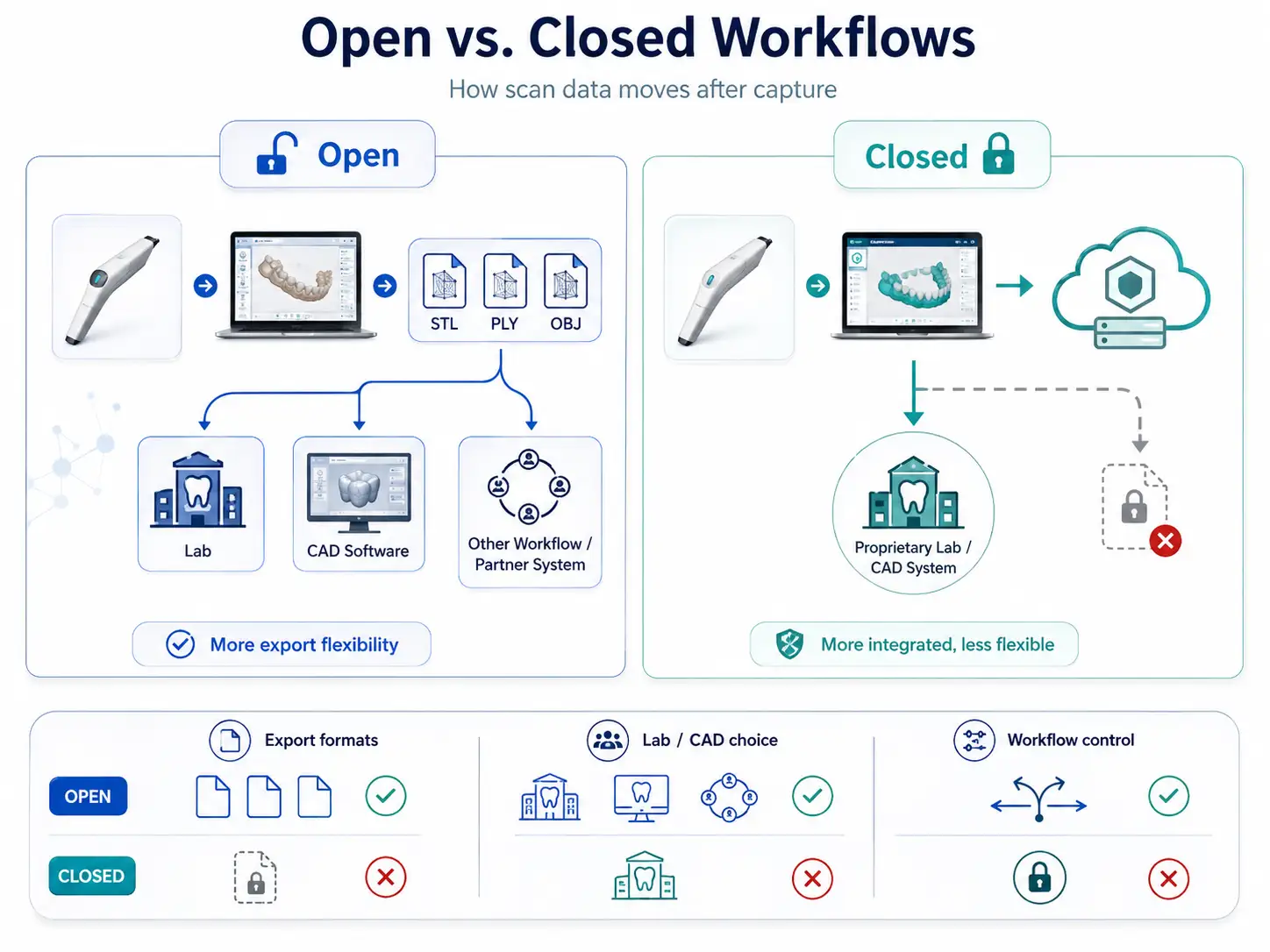
3. Understand Open vs. Closed Workflows
One of the most important purchasing questions is what happens to your scan data after capture.
An intraoral scanner is not an isolated device. It is part of a larger digital workflow connecting the clinic to laboratories, CAD software, restorative systems, orthodontic platforms, or other tools.
Before buying, ask:
- Can scan files be exported?
- Which file formats are available?
- Are exports included or subject to additional conditions?
- Is cloud access required?
- Can the scanner communicate with your current laboratory?
- Will your preferred CAD or downstream software accept the files?
- Are there subscriptions or software requirements?
- Are any parts of the workflow restricted to a particular ecosystem?
Common formats in digital dental workflows may include STL, PLY, or OBJ, but the availability and capabilities of any specific format should be confirmed for the scanner and software version you are considering.
| Question | Why It Matters |
| Can files be exported? | Determines workflow flexibility |
| Which formats are available? | Affects downstream compatibility |
| Is export included? | Can affect ongoing cost |
| Is cloud access required? | Affects connectivity and workflow |
| Can you work with your current lab? | Helps avoid workflow disruption |
| Are software subscriptions required? | Affects long-term ownership cost |
Do not label a system “open” or “closed” based only on marketing terminology. Ask exactly what you can export, where you can send it, and what conditions apply.
4. Decide Whether Wired or Wireless Matters to Your Clinic
Wireless operation can be valuable, but it is not automatically better for every practice.
A wired scanner may be completely suitable if it remains at one workstation and the cable does not interfere with your normal workflow.
A wireless option may become more attractive when the scanner needs to move regularly between operatories.
When comparing the two approaches, consider:
- how often the scanner moves between rooms;
- cable management;
- battery and charging workflow;
- how the device is stored between patients;
- infection-control procedures;
- connection stability;
- workstation location;
- how the scanner will be used during a full clinical day.
The important question is not whether wireless technology is more modern. It is whether wireless operation solves a real workflow problem for your clinic.
5. Check Computer Requirements Before You Buy
The scanner and computer should be considered as one working system.
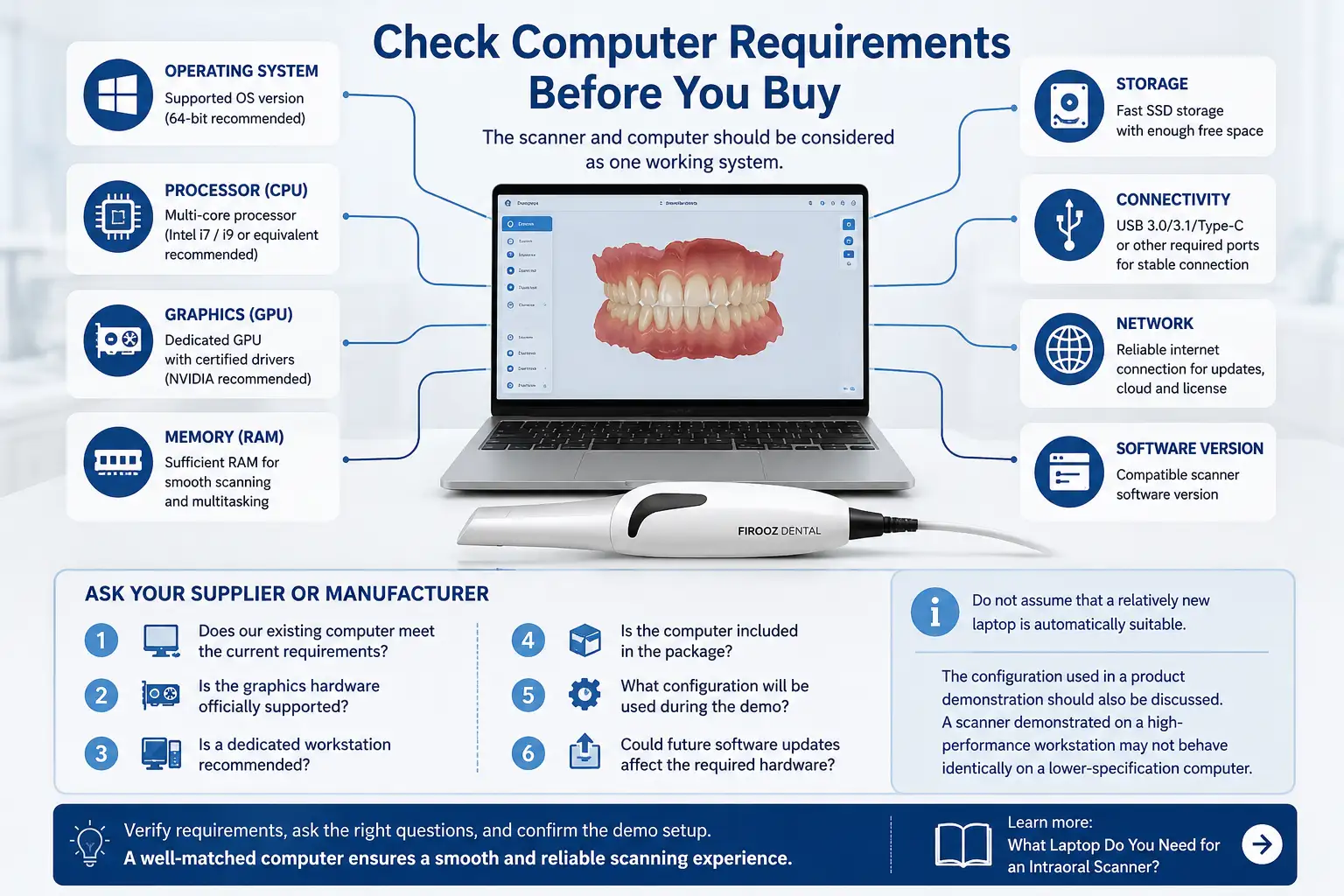
Before making a purchasing decision, verify the current hardware requirements for the exact scanner model and software version.
Requirements may involve factors such as:
- operating system;
- processor;
- graphics hardware;
- memory;
- storage;
- USB or other connectivity;
- network requirements;
- software version.
Do not assume that a relatively new laptop is automatically suitable.
Ask the supplier or manufacturer:
- Does our existing computer meet the current requirements?
- Is the graphics hardware officially supported?
- Is a dedicated workstation recommended?
- Is the computer included in the package?
- What configuration will be used during the demo?
- Could future software updates affect the required hardware?
The configuration used in a product demonstration should also be discussed. A scanner demonstrated on a high-performance workstation may not behave identically on a lower-specification computer.
For a more detailed discussion, see What Laptop Do You Need for an Intraoral Scanner?.
6. Evaluate the Software, Not Just the Handpiece
The handpiece is the most visible part of an intraoral scanner, but much of the day-to-day experience happens in the software.
During your evaluation, look at the entire software process:
- creating a patient or case;
- selecting the restoration or workflow;
- starting the scan;
- correcting missing areas;
- reviewing the scan;
- organizing cases;
- exporting or transferring files;
- communicating with the laboratory;
- accessing previous cases;
- installing updates;
- managing user accounts.
Ask which functions are included and whether any important workflow features require additional licenses, subscriptions, or accounts.
A useful test is to ask a team member who has not used the system before to perform part of the workflow. This can reveal usability issues that may not be obvious when an experienced product specialist operates the scanner.
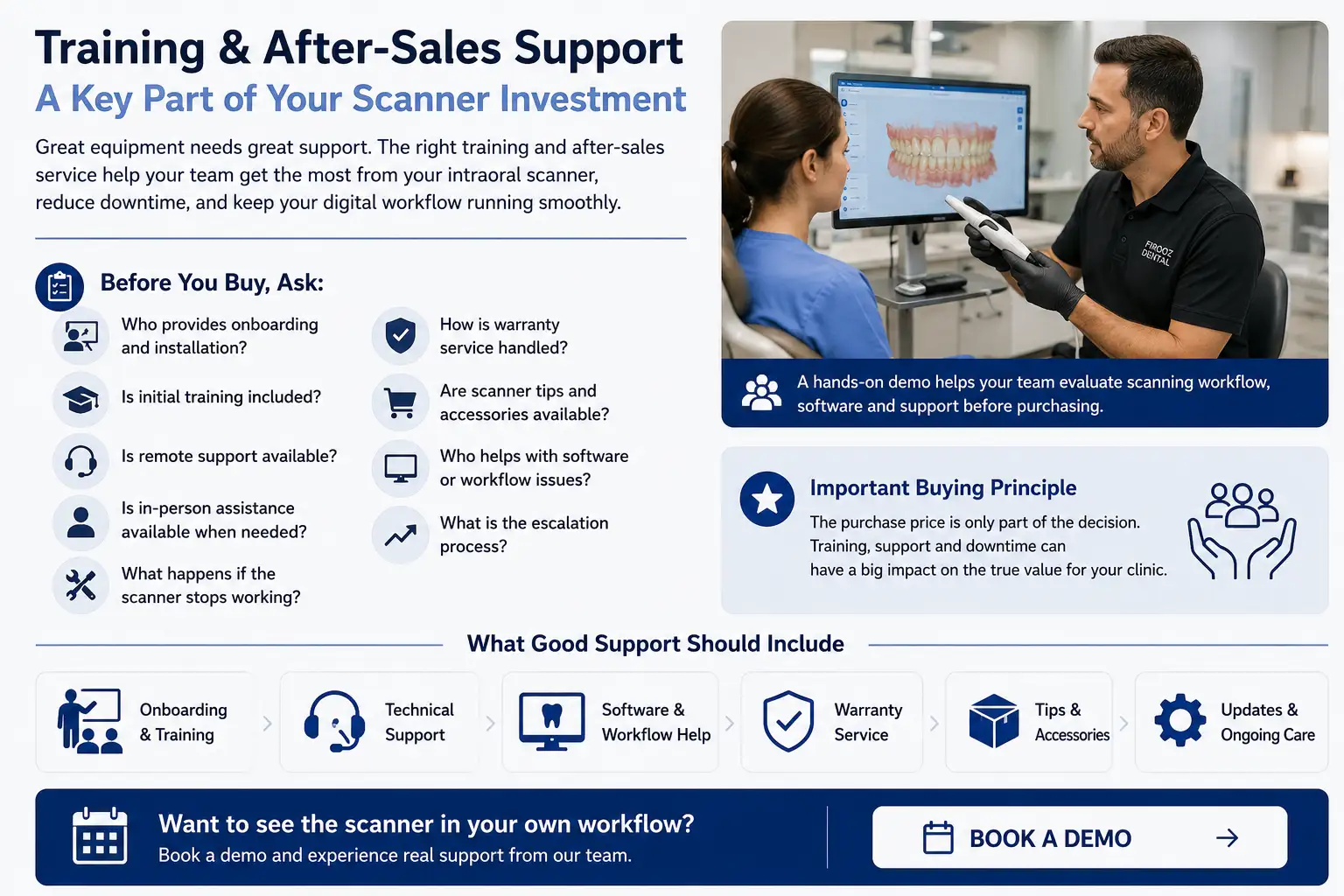
7. Consider Training and After-Sales Support
Buying the scanner is only the beginning of implementation.
A clinic should understand what happens during setup and what happens later if a problem occurs.
Before purchasing, ask:
- Who installs or configures the scanner?
- Is initial training included?
- Who trains additional team members?
- Is remote support available?
- Is in-person support available when required?
- How are software issues handled?
- How is warranty service handled?
- What happens if the scanner becomes unavailable?
- How are replacement tips or accessories obtained?
- Who helps when a workflow works differently from expected?
- Is there a clear escalation path for technical issues?
A lower purchase price may not represent better value if the clinic later struggles with implementation, workflow questions, or downtime.
For high-value digital equipment, support should be evaluated as part of the product—not as an afterthought.
Need help comparing scanner workflows and support options? Book a demo.
Must-Have vs. Nice-to-Have Features
Before comparing models, divide your requirements into two groups.
Must-Have Requirements
These are requirements that would prevent the scanner from fitting your clinic if they were missing.
Examples might include:
- support for your primary clinical workflow;
- required file export;
- compatibility with your laboratory;
- compatibility with your computer environment;
- a specific mobility requirement;
- an acceptable support process.
Nice-to-Have Features
These can improve the experience but are not necessary for the scanner to perform its main job.
The exact list will be different for every clinic.
A useful rule is:
If your team cannot explain when and how a feature will be used, it should not automatically influence the purchasing decision.
Avoid paying for a long feature list without first connecting each important feature to a real clinical or operational need.
Think About Total Cost, Not Only Purchase Price
The scanner price is only one component of the financial decision.
Depending on the system and clinic, additional costs may include:
- computer or workstation upgrades;
- software;
- subscriptions;
- scanner tips;
- accessories;
- training;
- service or warranty options;
- financing;
- maintenance;
- replacement equipment;
- operational downtime.
Before comparing quotes, make sure they include the same components.
A lower hardware price can be misleading if another necessary part of the workflow is excluded.
Create a simple ownership worksheet and ask every supplier to clearly identify:
- what is included;
- what is optional;
- what is recurring;
- what may need replacement;
- what may change over time.
This makes scanner comparisons more useful than comparing the initial purchase price alone.
How to Create a Shortlist
Once your requirements are clear, use a structured process.
Step 1: Define Your Top Three Use Cases
Write down the procedures that matter most to your clinic.
Step 2: Define Your Must-Haves
Include workflow, compatibility, computer, file export, support, and any other non-negotiable requirements.
Step 3: Eliminate Poor-Fit Systems
If a scanner cannot support an essential workflow, it should normally leave the shortlist regardless of how attractive its other features appear.
Step 4: Compare the Remaining Options
Compare them using the same criteria rather than changing the criteria for each brand.
Step 5: Demo the Finalists
Use similar cases and the same questions for each demonstration.
If you want to compare current options by use case, see our Best Intraoral Scanner guide.
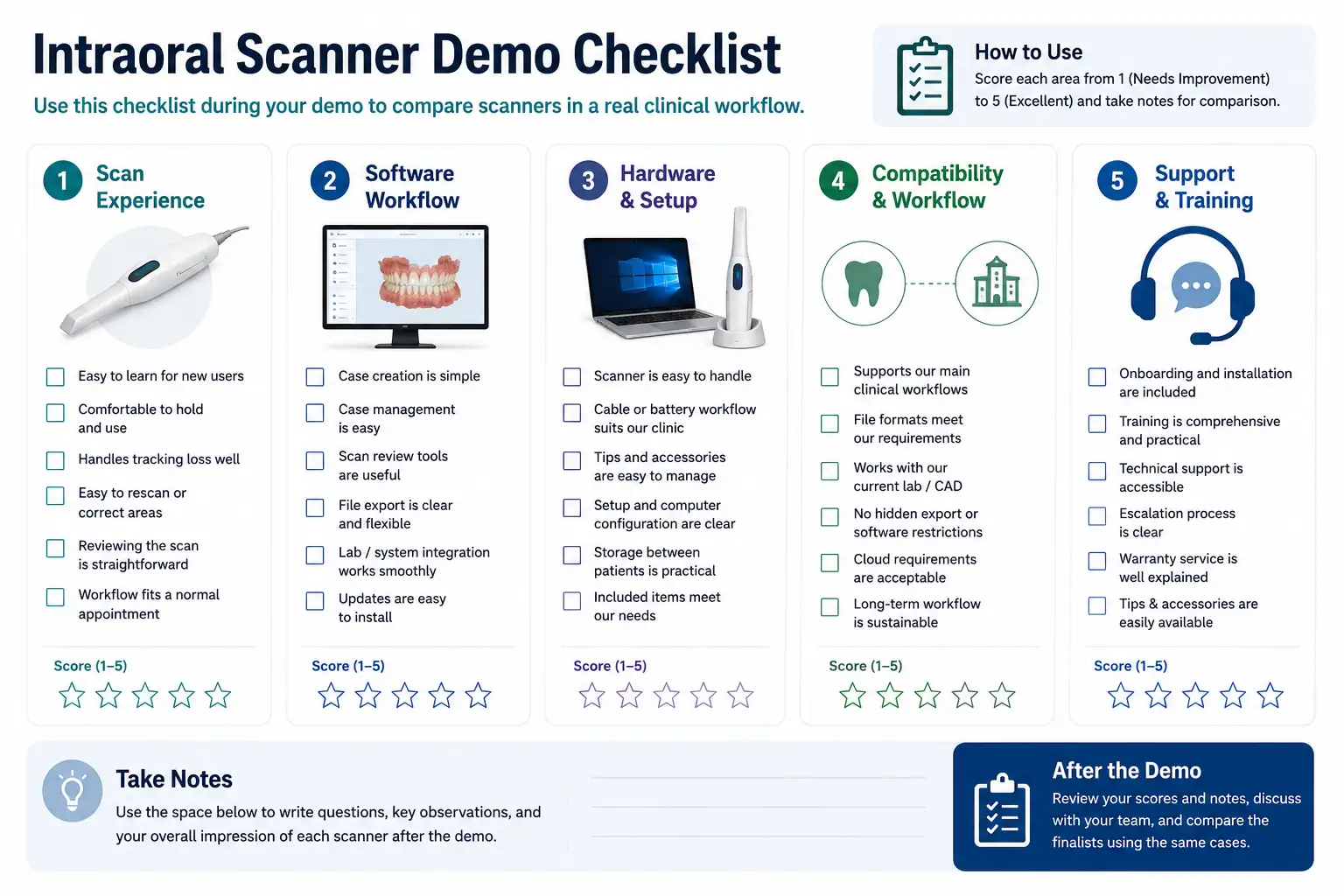
Intraoral Scanner Demo Checklist
A good demo should answer your purchasing questions, not simply show that the scanner can capture a few teeth.
Before the Demo
Prepare a short list of requirements:
- your main clinical use cases;
- your laboratory or CAD workflow;
- your computer environment;
- required file formats;
- your preferred scanner location;
- your most important support questions;
- your must-have features.
Whenever practical, evaluate a case that resembles the work your clinic performs regularly.
During the Demo: Scanning
Check:
- How quickly can a new user understand the workflow?
- How comfortable is the scanner to handle?
- How easy is it to start a case?
- What happens when tracking is interrupted?
- How easy is it to return to a missing area?
- How easy is it to review the completed scan?
- Does the workflow feel realistic for a normal appointment?
During the Demo: Software
Ask:
- How are cases created and organized?
- How are scans reviewed?
- How are files exported?
- How do you send a case to your current lab?
- Which functions require an account or subscription?
- How are software updates handled?
- Can another team member easily take over the workflow?
During the Demo: Hardware
Confirm:
- Which computer is being used?
- Is that the same configuration recommended for your clinic?
- What accessories are included?
- How are tips managed?
- If wireless, what does the charging workflow look like?
- If wired, how will the cable fit your operatory setup?
During the Demo: Support
Ask:
- Who handles installation?
- What training is included?
- Who should your team contact after purchase?
- How are technical problems escalated?
- How is warranty service handled?
- What happens if the scanner cannot be used temporarily?
Take notes during each demo. Comparing two systems from memory several days apart is much harder than comparing them using the same written checklist.
13 Questions to Ask Before Buying an Intraoral Scanner
Before signing a purchase agreement, make sure you can answer these questions:
- Is this scanner suitable for our main clinical use cases?
- Which file formats can we export?
- Are there restrictions or additional fees associated with export?
- Can we use the scanner with our current laboratory?
- Which computer configuration is required?
- Is a suitable computer included?
- Which software functions are included?
- Are there recurring software or subscription costs?
- What training is included?
- What warranty applies?
- Who provides technical support?
- How easily can we obtain tips, accessories, or replacement items?
- Can our team test the scanner using a realistic workflow before purchasing?
If the answers are vague, clarify them before making the final decision.
Which Intraoral Scanner Should Your Clinic Choose?
There is no single intraoral scanner that is automatically the best choice for every dental clinic.
The right scanner is the one that best matches your combination of:
- clinical use cases;
- digital workflow;
- laboratory relationships;
- interoperability requirements;
- computer environment;
- operator preferences;
- budget;
- training needs;
- support expectations.
Start with your workflow, not the product brochure.
Define what your clinic needs. Separate must-have requirements from nice-to-have features. Confirm software, computer, export, and support requirements. Then compare a small number of suitable scanners using the same criteria.
Most importantly, test the finalists in a realistic workflow before making the decision.
You can browse available intraoral scanners or review our Best Intraoral Scanner comparison to narrow your options.
FAQs
- Is the most expensive intraoral scanner always the best choice?
No. The best intraoral scanner is the one that fits your clinic’s main use cases, software workflow, lab relationships, computer setup, budget, and support requirements. A higher price or longer feature list does not automatically mean a better fit for your practice. - Do all intraoral scanners work with any dental lab?
Not necessarily. Before buying, confirm which file formats the scanner can export, whether exports are included, and whether your current lab or CAD software accepts those files. Some systems offer more workflow flexibility than others. - Do I need a new computer for an intraoral scanner?
Not always. Your existing computer may be suitable, but you should verify the current requirements for the exact scanner model and software version. Check the operating system, CPU, GPU, RAM, storage, connectivity, and any manufacturer-specific hardware requirements before purchasing. - Should a small dental clinic choose a wireless intraoral scanner?
It depends on how the scanner will be used. Wireless operation can be useful when the scanner moves between multiple operatories, while a wired scanner may be perfectly practical for a fixed workstation. Compare mobility, charging, battery management, cable handling, and your daily workflow rather than choosing wireless by default. - What should I test during an intraoral scanner demo?
Test the scanner using a workflow that resembles your normal clinical cases. Evaluate ease of scanning, tracking recovery, rescanning, software usability, file export, lab compatibility, computer configuration, ergonomics, and the training and support included after purchase.