Dental equipment supplier in Canada

Used Intraoral Scanner Buying Guide: How to Choose the Right Second-Hand Dental Scanner Without Costly Mistakes

Published on June 16, 2026

share this post

Used Intraoral Scanner

Buying a used intraoral scanner can be a smart way to enter digital dentistry without paying the full price of a new unit, but it is not the same as buying a handpiece, camera, or simple piece of dental equipment. You are buying more than the scanner body. You are buying access to software, license rights, scan tips, cables, support, training, updates, file export options, and lab compatibility. That is where many buyers get caught. A cheap listing for a used intraoral scanner for sale may look like a great deal at first, but if the license cannot be transferred, the account is locked, the scan tips are missing, or the brand no longer supports that model in your country, the low price can quickly turn into an expensive mistake. In second-hand digital dental equipment, the biggest risk is often not the scanner itself; it is what does not come with it.

here is an audio version of what will come:

this is a very good The Dentist’s Guide to Buying an Intraoral Scanner:

Who Should Consider a Used Intraoral Scanner?

A used intraoral scanner is not the right choice for every clinic. It makes the most sense when the buyer has a clear plan, knows the intended clinical use, and understands the software, service, and training costs that may come after the purchase. A low price alone should never be the reason to buy an intraoral scanner second hand.
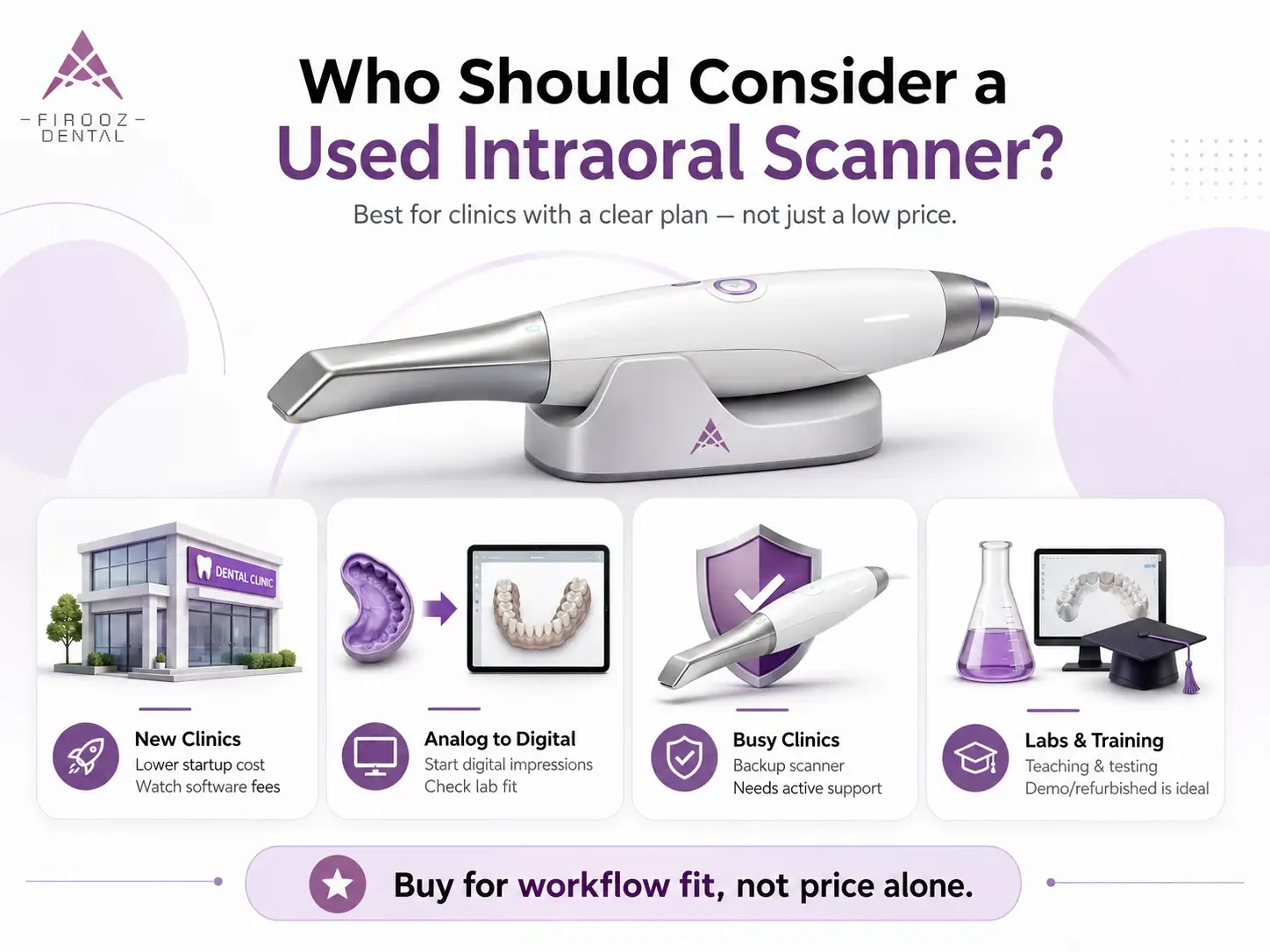
Who Should Consider a Used Intraoral Scanner?

New clinics with limited capital

For a new dental clinic, a second-hand scanner can reduce the cost of moving into digital impressions. Instead of spending a large part of the startup budget on a brand-new unit, the clinic may use a pre-owned scanner for basic restorative scans, patient education, and lab communication.

The risk is buying a device that looks affordable but needs paid software access, new scan tips, a better laptop, or extra training. For a new clinic, the safest choice is usually a scanner with active software, clear ownership documents, and a seller who can provide a live demo.

Practices moving from analog impressions to digital scans

Clinics that still use traditional impression materials may benefit from a used scanner as a first step into digital dentistry. For simple crown, bridge, and scan-and-send cases, a mid-range dental scanner for clinic use may be enough.

The buyer should not choose only by brand name. The better question is: will this scanner work with my lab, my team, and my daily cases? If the clinic plans to use the scanner for implants, clear trays, or chairside CAD/CAM, the inspection should be much stricter.

Clinics needing a backup scanner

A used scanner can also work well as a backup unit. If the main scanner fails, a second scanner can keep the clinic running, especially in practices that depend on digital impressions every day.

For this use case, the backup scanner does not always need to be the newest model. But it must still be functional, supported, and ready to export files when needed.

Labs or training centers testing digital workflows

Dental labs, schools, and training centers may use a second-hand scanner for education, testing, or workflow comparison. In this case, the scanner may not need to be perfect for heavy clinical use, but it should be stable enough for repeated demonstrations.

Buyer type Main goal Main risk Better buying route
New clinic Lower startup cost Hidden software fees Pre-owned with demo
Analog clinic Start digital impressions Poor lab fit Scanner approved by lab
Busy clinic Backup scanner Outdated support Tested used unit
Training center Teaching and testing Heavy prior use Demo or refurbished unit

Used vs Refurbished vs Certified Pre-Owned vs Open-Box: What’s the Difference?

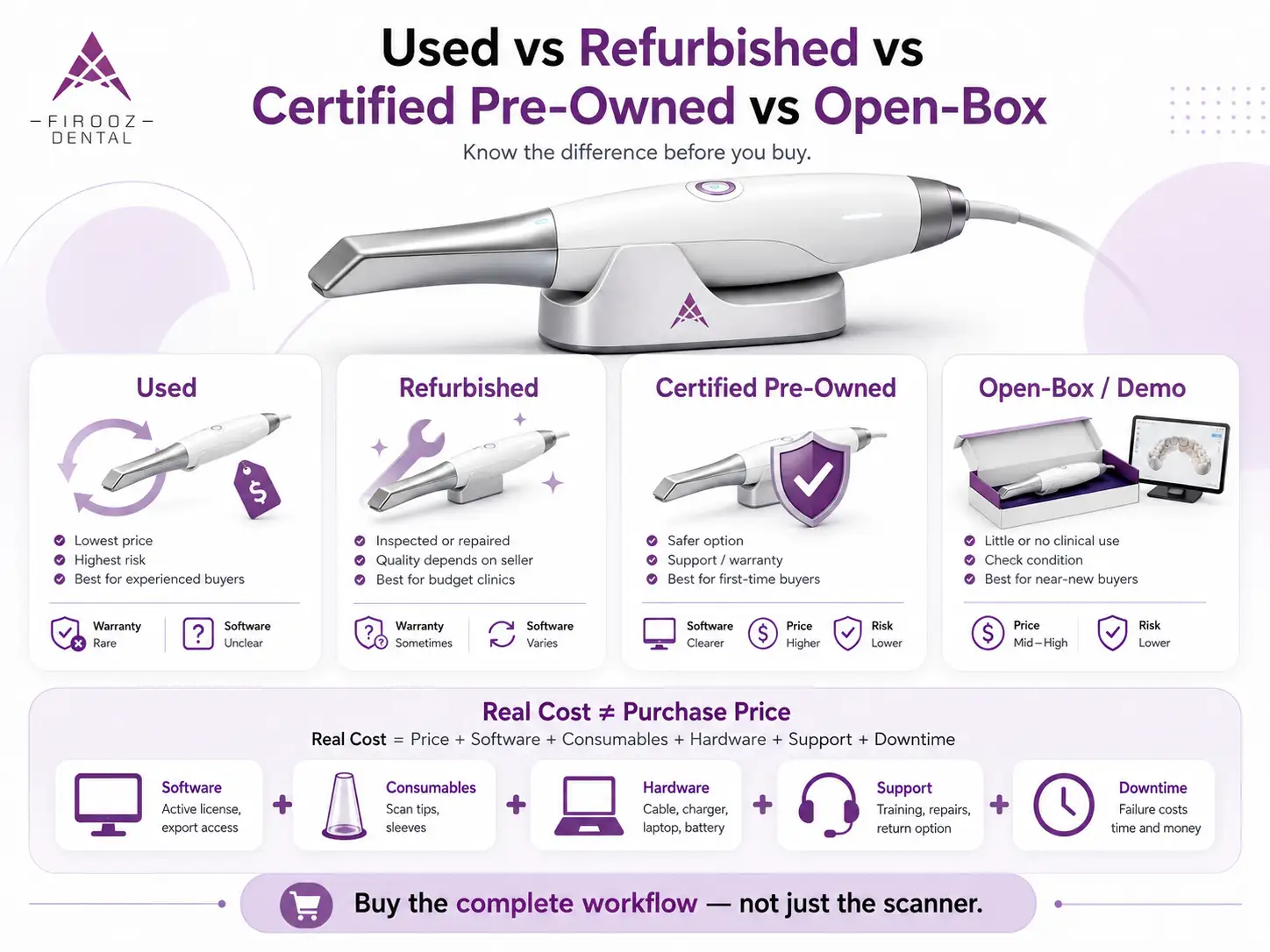
Used vs Refurbished vs Certified Pre-Owned vs Open-Box: What’s the Difference?

These terms are often used loosely, but they do not mean the same thing. Understanding the difference can prevent a costly mistake.

A used intraoral scanner usually means the device was owned and used before. It may be in good condition, but it has not always been checked, repaired, or prepared for resale. This is the highest-risk category unless the seller provides proof of function, software status, service history, and a return option.

A refurbished intraoral scanner has usually been inspected, cleaned, repaired, or prepared for resale. The problem is that “refurbished” depends heavily on who did the work. A scanner refurbished by a skilled dental equipment dealer is very different from one cleaned by an unknown seller.

A certified pre-owned dental scanner is usually the safer second-hand option. It often comes from a dealer, distributor, or official resale program, with some level of testing, support, training, or warranty. It usually costs more than a normal used unit, but the lower risk can be worth it.

An open-box dental scanner means the package was opened, but the device may have little or no clinical use. A demo intraoral scanner was used for presentations, training, or showroom use, so its condition depends on how often it was handled.

Type Warranty Software access Price Risk level Best for
Used Rare Unclear Lowest High Experienced buyers
Refurbished Sometimes Varies Medium Medium Budget clinics
Certified pre-owned Often included Clearer Higher Lower First-time buyers
Open-box Often possible Usually clearer Medium-high Lower Clinics wanting near-new condition
Demo unit Varies Must be checked Medium Medium Training or light clinical use

The Real Cost of a Used Intraoral Scanner Is Not Just the Purchase Price

The listing price of a used intraoral scanner is only the first number. The real cost includes the scanner, software access, subscription fees, scan tips, cables, batteries, calibration tools, training, support, and the cost of downtime if the unit fails during clinical use.

A simple way to calculate it is:

Real Cost = Purchase Price + Software + Consumables + Training + Support + Downtime Risk

Software access and subscription fees

Before looking at the scanner body, check the software. Some scanners need an active account, paid subscription, or access fee to scan, export files, connect to labs, or receive updates. A scanner may turn on and still be useless if the software is locked.

Ask the seller for proof of software status, account ownership, and export access. For systems connected to platforms such as 3Shape Unite, 3Shape Communicate, iTero account, or Medit Link, confirm whether the license can move to your name before payment.

Replacement scan tips and sleeves

Scan tips, sleeves, and autoclavable parts can add real cost. A cheap intraoral scanner second hand with missing or damaged tips may cost more after you buy replacements. Also check whether tips are still available in your country.

Laptop, cart, cables, batteries, and accessories

Some scanners need a powerful laptop or cart to run properly. Others depend on special cables, chargers, batteries, or calibration tools. If any of these are missing, calculate the replacement cost before calling the deal cheap.

Training, repairs, downtime, and support

A scanner is only useful if your team can use it well. Poor scanning technique leads to bad margins, failed bite scans, and lab remakes. Also ask who will repair the scanner if it fails. In clinical work, downtime can cost more than the repair itself.

Cost item What to check
Software Active license, export access, account transfer
Consumables Scan tips, sleeves, calibration parts
Hardware Cable, charger, laptop, battery
Support Repair route, training, return option

Buying a used intraoral scanner can be a smart way to enter digital dentistry without paying the full price of a new unit, but it is not the same as buying a handpiece, camera, or simple piece of dental equipment. You are buying more than the scanner body. You are buying access to software, license rights, scan tips, cables, support, training, updates, file export options, and lab compatibility. That is where many buyers get caught. A cheap listing for a used intraoral scanner for sale may look like a great deal at first, but if the license cannot be transferred, the account is locked, the scan tips are missing, or the brand no longer supports that model in your country, the low price can quickly turn into an expensive mistake. In second-hand digital dental equipment, the biggest risk is often not the scanner itself; it is what does not come with it. here is an audio version of what will come: this is a very good The Dentist’s Guide to Buying an Intraoral Scanner: Who Should Consider a Used Intraoral Scanner? A used intraoral scanner is not the right choice for every clinic. It makes the most sense when the buyer has a clear plan, knows the intended clinical use, and understands the software, service, and training costs that may come after the purchase. A low price alone should never be the reason to buy an intraoral scanner second hand. New clinics with limited capital For a new dental clinic, a second-hand scanner can reduce the cost of moving into digital impressions. Instead of spending a large part of the startup budget on a brand-new unit, the clinic may use a pre-owned scanner for basic restorative scans, patient education, and lab communication. The risk is buying a device that looks affordable but needs paid software access, new scan tips, a better laptop, or extra training. For a new clinic, the safest choice is usually a scanner with active software, clear ownership documents, and a seller who can provide a live demo. Practices moving from analog impressions to digital scans Clinics that still use traditional impression materials may benefit from a used scanner as a first step into digital dentistry. For simple crown, bridge, and scan-and-send cases, a mid-range dental scanner for clinic use may be enough. The buyer should not choose only by brand name. The better question is: will this scanner work with my lab, my team, and my daily cases? If the clinic plans to use the scanner for implants, clear trays, or chairside CAD/CAM, the inspection should be much stricter. Clinics needing a backup scanner A used scanner can also work well as a backup unit. If the main scanner fails, a second scanner can keep the clinic running, especially in practices that depend on digital impressions every day. For this use case, the backup scanner does not always need to be the newest model. But it must still be functional, supported, and ready to export files when needed. Labs or training centers testing digital workflows Dental labs, schools, and training centers may use a second-hand scanner for education, testing, or workflow comparison. In this case, the scanner may not need to be perfect for heavy clinical use, but it should be stable enough for repeated demonstrations. Buyer type Main goal Main risk Better buying route New clinic Lower startup cost Hidden software fees Pre-owned with demo Analog clinic Start digital impressions Poor lab fit Scanner approved by lab Busy clinic Backup scanner Outdated support Tested used unit Training center Teaching and testing Heavy prior use Demo or refurbished unit Used vs Refurbished vs Certified Pre-Owned vs Open-Box: What’s the Difference? These terms are often used loosely, but they do not mean the same thing. Understanding the difference can prevent a costly mistake. A used intraoral scanner usually means the device was owned and used before. It may be in good condition, but it has not always been checked, repaired, or prepared for resale. This is the highest-risk category unless the seller provides proof of function, software status, service history, and a return option. A refurbished intraoral scanner has usually been inspected, cleaned, repaired, or prepared for resale. The problem is that “refurbished” depends heavily on who did the work. A scanner refurbished by a skilled dental equipment dealer is very different from one cleaned by an unknown seller. A certified pre-owned dental scanner is usually the safer second-hand option. It often comes from a dealer, distributor, or official resale program, with some level of testing, support, training, or warranty. It usually costs more than a normal used unit, but the lower risk can be worth it. An open-box dental scanner means the package was opened, but the device may have little or no clinical use. A demo intraoral scanner was used for presentations, training, or showroom use, so its condition depends on how often it was handled. Type Warranty Software access Price Risk level Best for Used Rare Unclear Lowest High Experienced buyers Refurbished Sometimes Varies Medium Medium Budget clinics Certified pre-owned Often included Clearer Higher Lower First-time buyers Open-box Often possible Usually clearer Medium-high Lower Clinics wanting near-new condition Demo unit Varies Must be checked Medium Medium Training or light clinical use The Real Cost of a Used Intraoral Scanner Is Not Just the Purchase Price The listing price of a used intraoral scanner is only the first number. The real cost includes the scanner, software access, subscription fees, scan tips, cables, batteries, calibration tools, training, support, and the cost of downtime if the unit fails during clinical use. A simple way to calculate it is: Real Cost = Purchase Price + Software + Consumables + Training + Support + Downtime Risk Software access and subscription fees Before looking at the scanner body, check the software. Some scanners need an active account, paid subscription, or access fee to scan, export files, connect to labs, or receive updates. A scanner may turn on and still be useless if the software is locked. Ask the seller for proof of software status, account ownership, and export access. For systems connected to platforms such as 3Shape Unite, 3Shape Communicate, iTero account, or Medit Link, confirm whether the license can move to your name before payment. Replacement scan tips and sleeves Scan tips, sleeves, and autoclavable parts can add real cost. A cheap intraoral scanner second hand with missing or damaged tips may cost more after you buy replacements. Also check whether tips are still available in your country. Laptop, cart, cables, batteries, and accessories Some scanners need a powerful laptop or cart to run properly. Others depend on special cables, chargers, batteries, or calibration tools. If any of these are missing, calculate the replacement cost before calling the deal cheap. Training, repairs, downtime, and support A scanner is only useful if your team can use it well. Poor scanning technique leads to bad margins, failed bite scans, and lab remakes. Also ask who will repair the scanner if it fails. In clinical work, downtime can cost more than the repair itself. Cost item What to check Software Active license, export access, account transfer Consumables Scan tips, sleeves, calibration parts Hardware Cable, charger, laptop, battery Support Repair route, training, return option Check the Software License Before You Check the Scanner Body In the used market, software can matter more than hardware. A clean-looking used dental scanner may become a bad purchase if the license cannot be transferred. Ask these questions before payment: Can the scanner license be moved to a new owner? Is the device locked to a previous account or dongle? Are updates and file export still available? What happens if the previous owner stops paying fees? Before sending money, request the serial number, screenshot of account status, written confirmation from the dealer or maker, and a test export file. Do not accept vague answers such as “it should work.” Open System or Closed Ecosystem: Why File Export Matters A scanner must fit your clinical workflow and dental lab. File export is one of the most important checks when buying a used intraoral scanner for sale. Format Main use STL Common for models, crowns, many lab workflows PLY Can include color data OBJ Can include shape and texture data Ask your lab to review a sample file from the same scanner model before you buy. A closed system can still make sense if your cases stay inside that brand’s workflow, but it may limit lab choice or add fees later. What to Inspect Physically Before Buying a Second-Hand Intraoral Scanner Check the wand body, lens, optics, cable, connector, charger, and power stability. Look for cracks, scratches on the lens, loose ports, unstable connection, overheating, or missing serial labels. For wireless scanners, ask about battery age and charging behavior. For all scanners, inspect the scan tips and sterilization history. Missing tips, damaged optics, and no calibration tool are serious warning signs. Calibration and Accuracy: How to Know If a Used Scanner Still Performs Well Turning on the scanner is not enough. Test scan quality before purchase. Run a quadrant scan, full-arch scan, bite scan, and file export. Check for stitching errors, distorted arches, poor margin capture, and bite mismatch. If you plan implant work, test scan bodies. If you scan reflective surfaces or edentulous areas often, test those too. Accuracy depends on the scanner, software version, maintenance, scanning technique, and operator skill. Questions to Ask the Seller Before You Buy Ask for ownership proof, invoice, serial number, service history, repair history, last date of use, package contents, return policy, and warranty status. Copy-Paste Seller Message “Hi, I’m interested in this scanner. Can you confirm the serial number, current software status, license transfer option, account status, included scan tips, calibration tools, service history, and return policy? Can you also send a short video showing a live scan and file export?” Where to Buy a Used Intraoral Scanner Marketplaces may offer lower prices, but they carry higher risk around software, support, and authenticity. A dealer or certified pre-owned seller usually costs more but may include testing, training, and warranty. Dentist-to-dentist sales can be good when ownership documents and software transfer are clear. Match the Scanner to Your Clinical Workflow For scan-and-send cases, lab compatibility and file export matter most. For crowns and bridges, margin capture and bite scans matter. For clear aligners, case portal access matters. For implants, full-arch behavior and scan body support matter. For same-day dentistry, check CAD/CAM connection before purchase. Common Red Flags Not every used intraoral scanner for sale is worth your time. Some listings look attractive because the price is low, but the missing details are often where the real risk begins. Before you move forward, slow down and check whether the seller can prove that the scanner is usable, transferable, and complete. Walk away from the deal if you see any of these warning signs: No serial number is shown or shared by the seller No invoice, receipt, or proof of ownership is available The scanner is still linked to the previous owner’s account The seller cannot confirm the software license status Subscription fees or access fees are unclear Scan tips, sleeves, calibration tools, charger, or cables are missing The seller does not offer a return window The price is far below the normal market range The seller cannot provide a live scan video No test export file is available The scanner has an unclear repair history The model is old and may no longer receive support The listing uses vague wording and avoids technical details One more important point: make sure the listing is for a real 3D intraoral scanner, not an intraoral camera. Some sellers use similar terms, but an intraoral camera only takes images; it does not create digital impressions for crowns, aligners, implants, or CAD/CAM work. A cheap scanner with a locked account, missing software, or no support is not a bargain. It is a risk with a nice price tag. Used Intraoral Scanner Buying Checklist Before payment, confirm model year, software status, license transfer, lab approval, scan test, export test, included accessories, seller history, return window, and repair route. After delivery, register the scanner, update software, run calibration, and send a test case to your lab before using it on a paid case. Before contacting the seller, check: Exact model and generation Year of purchase or first use Current market price for similar units Availability of scan tips and parts in your country Local service or repair options Whether your lab accepts files from that scanner During the inspection or demo, ask the seller to show: A live scan of a quadrant or full arch A bite scan File export in STL, PLY, or OBJ when available Software account status Scanner connection stability Condition of the wand, lens, cable, charger, and tips Any calibration message or error warning Before payment, confirm: Serial number Proof of ownership License transfer option Subscription or access fee status Included accessories Return policy Warranty status, if any Written confirmation of what is included in the sale After delivery, do not use the scanner on a paid case right away. First: Register the scanner under your clinic or account Install or update the software Run calibration if required Perform a test scan Export a sample file Send the file to your dental lab for review Check fit, margins, bite, and file quality before clinical use When You Should Not Buy a Used Intraoral Scanner Do not buy used if the brand has no support in your country, the license cannot transfer, tips are hard to find, the model is too old, or your clinic depends on high-volume implant and full-arch work. A cheap scanner is not a bargain if it cannot serve your daily cases. Final Decision Framework Choose the scanner only after five checks: workflow fit, software transfer, physical condition, lab compatibility, and real cost. If the scanner fails on license, support, or accuracy, the price should not save the deal. FAQs Is buying a used intraoral scanner a good idea? Yes, buying a used intraoral scanner can be a good choice if the device has active software, transferable license rights, working accessories, available scan tips, and support in your country. The main risk is not only the scanner body; it is the software, account access, file export, and service history. What should I check before buying a used intraoral scanner? Before payment, check the serial number, proof of ownership, software license status, subscription fees, account transfer option, scan tips, calibration tool, cables, charger, battery health, return policy, and a live scan demo. Also ask the seller to export a sample STL, PLY, or OBJ file. What is the difference between used, refurbished, and certified pre-owned scanners? A used scanner is sold as previously owned and may not be tested. A refurbished scanner has usually been checked, cleaned, or repaired by the seller. A certified pre-owned scanner often comes from a dealer or official resale program and may include testing, training, warranty, or clearer software access. Can a used intraoral scanner license be transferred? Sometimes, but not always. License transfer depends on the brand, software platform, region, subscription status, and seller account. Before buying an intraoral scanner second hand, ask for written confirmation that the software, account, cloud access, and export features can be moved to your name. How much does a used intraoral scanner really cost? The real cost is more than the listing price. You should add software fees, subscription or access fees, scan tips, sleeves, replacement cables, batteries, laptop or cart requirements, training, repairs, and downtime risk. A cheap used intraoral scanner for sale can become expensive if key items are missing. Which used intraoral scanner brand is best? There is no single best brand for every clinic. The better choice depends on your workflow. For basic scan-and-send cases, lab compatibility and file export matter most. For aligners, implants, or chairside CAD/CAM, you need to check software access, accuracy, scan body support, and local service options. When should I avoid buying a used intraoral scanner? Avoid the purchase if the seller cannot provide a serial number, proof of ownership, live scan demo, software status, or return option. Also be careful with locked accounts, missing tips, unclear subscription fees, old unsupported models, and listings that confuse an intraoral camera with a real 3D intraoral scanner.

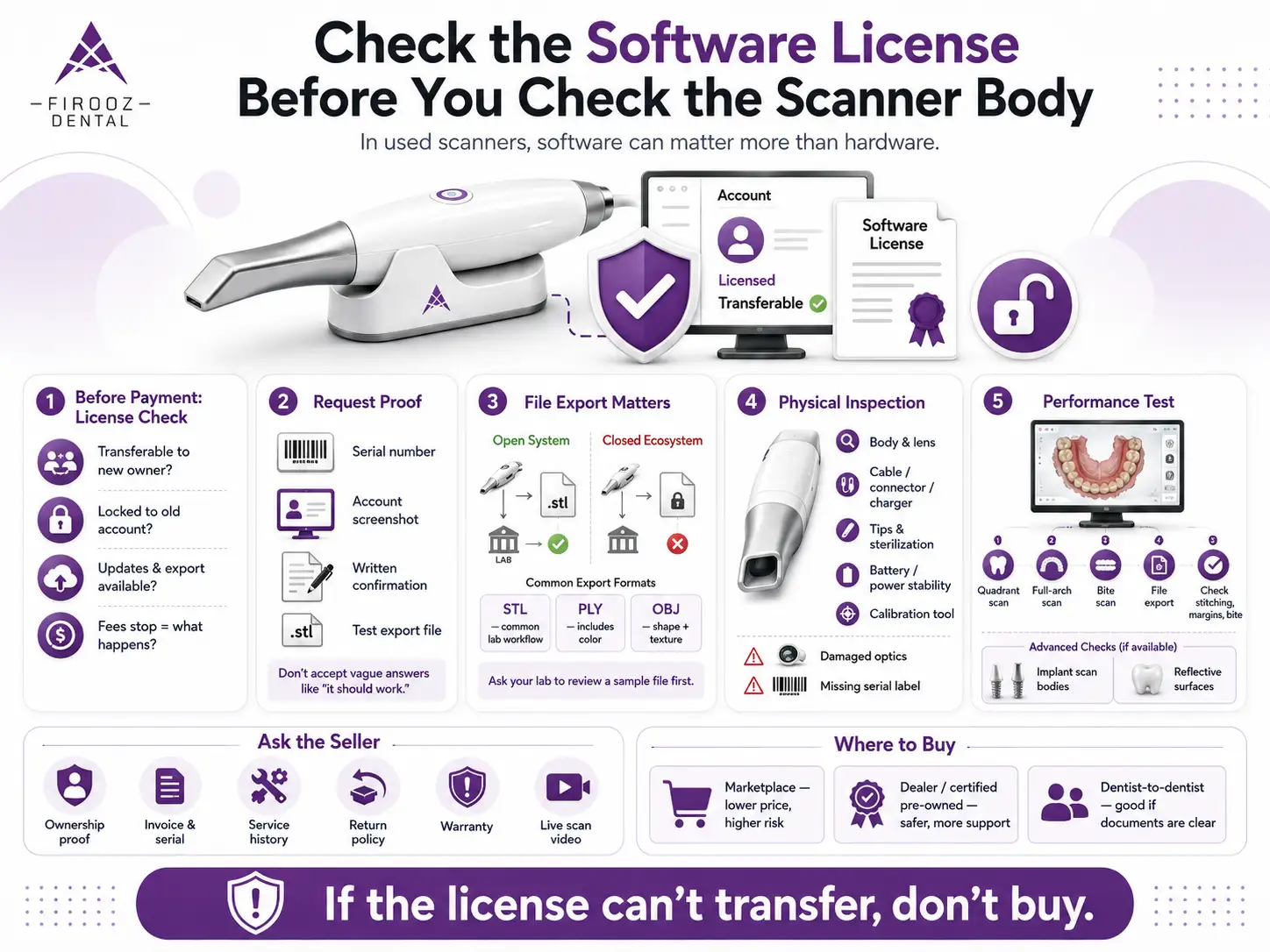
Check the Software License Before You Check the Scanner Body

In the used market, software can matter more than hardware. A clean-looking used dental scanner may become a bad purchase if the license cannot be transferred.

Ask these questions before payment:

  • Can the scanner license be moved to a new owner?
  • Is the device locked to a previous account or dongle?
  • Are updates and file export still available?
  • What happens if the previous owner stops paying fees?

Before sending money, request the serial number, screenshot of account status, written confirmation from the dealer or maker, and a test export file. Do not accept vague answers such as “it should work.”


Open System or Closed Ecosystem: Why File Export Matters

A scanner must fit your clinical workflow and dental lab. File export is one of the most important checks when buying a used intraoral scanner for sale.

Format Main use
STL Common for models, crowns, many lab workflows
PLY Can include color data
OBJ Can include shape and texture data

Ask your lab to review a sample file from the same scanner model before you buy. A closed system can still make sense if your cases stay inside that brand’s workflow, but it may limit lab choice or add fees later.

What to Inspect Physically Before Buying a Second-Hand Intraoral Scanner

Check the wand body, lens, optics, cable, connector, charger, and power stability. Look for cracks, scratches on the lens, loose ports, unstable connection, overheating, or missing serial labels.

For wireless scanners, ask about battery age and charging behavior. For all scanners, inspect the scan tips and sterilization history. Missing tips, damaged optics, and no calibration tool are serious warning signs.

Calibration and Accuracy: How to Know If a Used Scanner Still Performs Well

Turning on the scanner is not enough. Test scan quality before purchase. Run a quadrant scan, full-arch scan, bite scan, and file export. Check for stitching errors, distorted arches, poor margin capture, and bite mismatch.

If you plan implant work, test scan bodies. If you scan reflective surfaces or edentulous areas often, test those too. Accuracy depends on the scanner, software version, maintenance, scanning technique, and operator skill.

Questions to Ask the Seller Before You Buy

Ask for ownership proof, invoice, serial number, service history, repair history, last date of use, package contents, return policy, and warranty status.

Copy-Paste Seller Message

“Hi, I’m interested in this scanner. Can you confirm the serial number, current software status, license transfer option, account status, included scan tips, calibration tools, service history, and return policy? Can you also send a short video showing a live scan and file export?”

Where to Buy a Used Intraoral Scanner

Marketplaces may offer lower prices, but they carry higher risk around software, support, and authenticity. A dealer or certified pre-owned seller usually costs more but may include testing, training, and warranty. Dentist-to-dentist sales can be good when ownership documents and software transfer are clear.

Match the Scanner to Your Clinical Workflow

For scan-and-send cases, lab compatibility and file export matter most. For crowns and bridges, margin capture and bite scans matter. For clear aligners, case portal access matters. For implants, full-arch behavior and scan body support matter. For same-day dentistry, check CAD/CAM connection before purchase.
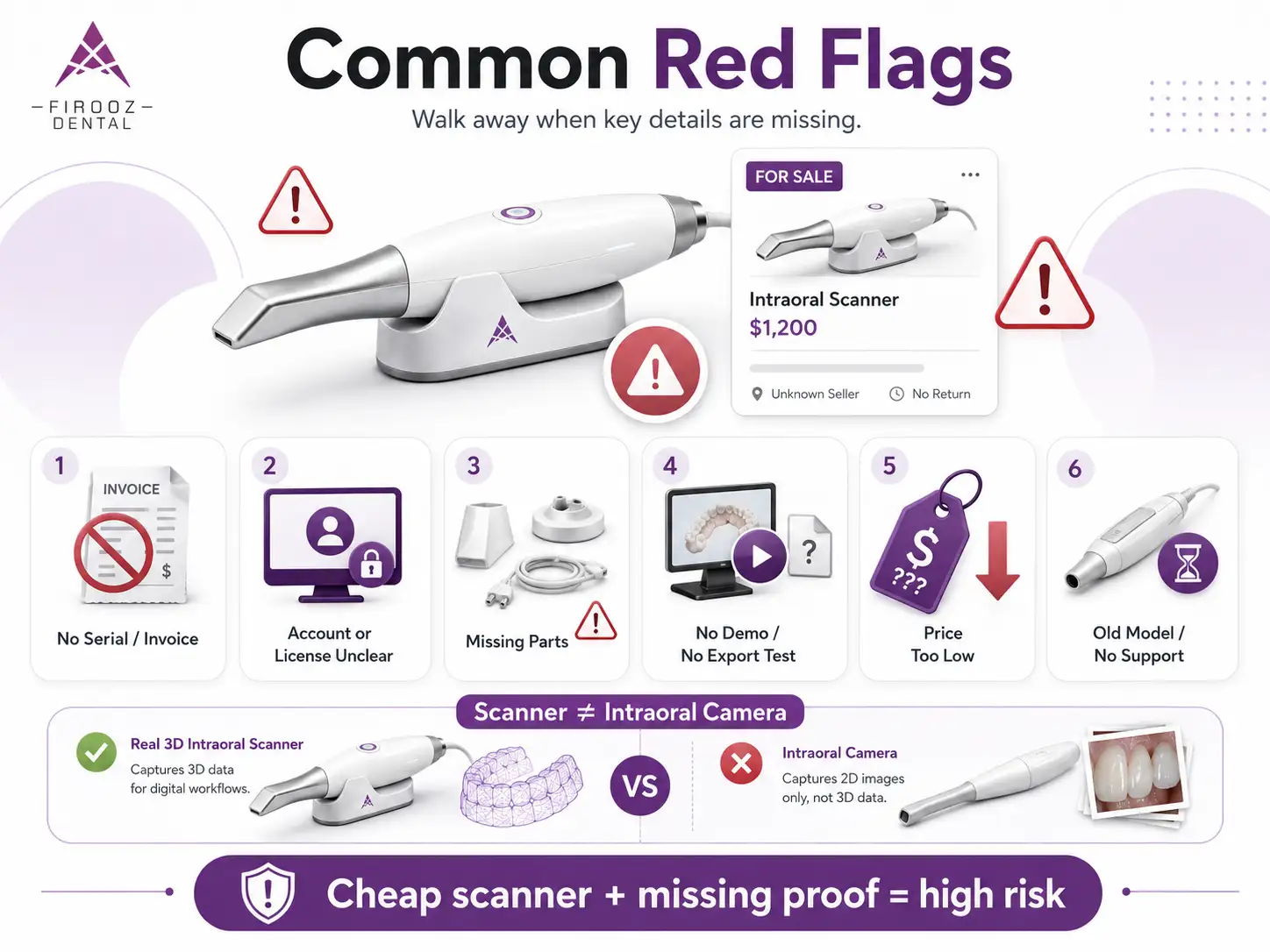
Common Red Flags in used intraoral scanners

Common Red Flags

Not every used intraoral scanner for sale is worth your time. Some listings look attractive because the price is low, but the missing details are often where the real risk begins. Before you move forward, slow down and check whether the seller can prove that the scanner is usable, transferable, and complete.

Walk away from the deal if you see any of these warning signs:

  • No serial number is shown or shared by the seller
  • No invoice, receipt, or proof of ownership is available
  • The scanner is still linked to the previous owner’s account
  • The seller cannot confirm the software license status
  • Subscription fees or access fees are unclear
  • Scan tips, sleeves, calibration tools, charger, or cables are missing
  • The seller does not offer a return window
  • The price is far below the normal market range
  • The seller cannot provide a live scan video
  • No test export file is available
  • The scanner has an unclear repair history
  • The model is old and may no longer receive support
  • The listing uses vague wording and avoids technical details

One more important point: make sure the listing is for a real 3D intraoral scanner, not an intraoral camera. Some sellers use similar terms, but an intraoral camera only takes images; it does not create digital impressions for crowns, aligners, implants, or CAD/CAM work.

A cheap scanner with a locked account, missing software, or no support is not a bargain. It is a risk with a nice price tag.

Used Intraoral Scanner Buying Checklist

Before payment, confirm model year, software status, license transfer, lab approval, scan test, export test, included accessories, seller history, return window, and repair route. After delivery, register the scanner, update software, run calibration, and send a test case to your lab before using it on a paid case.

Before contacting the seller, check:

  • Exact model and generation
  • Year of purchase or first use
  • Current market price for similar units
  • Availability of scan tips and parts in your country
  • Local service or repair options
  • Whether your lab accepts files from that scanner

During the inspection or demo, ask the seller to show:

  • A live scan of a quadrant or full arch
  • A bite scan
  • File export in STL, PLY, or OBJ when available
  • Software account status
  • Scanner connection stability
  • Condition of the wand, lens, cable, charger, and tips
  • Any calibration message or error warning

Before payment, confirm:

  • Serial number
  • Proof of ownership
  • License transfer option
  • Subscription or access fee status
  • Included accessories
  • Return policy
  • Warranty status, if any
  • Written confirmation of what is included in the sale

After delivery, do not use the scanner on a paid case right away. First:

  • Register the scanner under your clinic or account
  • Install or update the software
  • Run calibration if required
  • Perform a test scan
  • Export a sample file
  • Send the file to your dental lab for review
  • Check fit, margins, bite, and file quality before clinical use

When You Should Not Buy a Used Intraoral Scanner

Do not buy used if the brand has no support in your country, the license cannot transfer, tips are hard to find, the model is too old, or your clinic depends on high-volume implant and full-arch work. A cheap scanner is not a bargain if it cannot serve your daily cases.

Final Decision Framework

Choose the scanner only after five checks: workflow fit, software transfer, physical condition, lab compatibility, and real cost. If the scanner fails on license, support, or accuracy, the price should not save the deal.

FAQs

  1. Is buying a used intraoral scanner a good idea?

Yes, buying a used intraoral scanner can be a good choice if the device has active software, transferable license rights, working accessories, available scan tips, and support in your country. The main risk is not only the scanner body; it is the software, account access, file export, and service history.

  1. What should I check before buying a used intraoral scanner?

Before payment, check the serial number, proof of ownership, software license status, subscription fees, account transfer option, scan tips, calibration tool, cables, charger, battery health, return policy, and a live scan demo. Also ask the seller to export a sample STL, PLY, or OBJ file.

  1. What is the difference between used, refurbished, and certified pre-owned scanners?

A used scanner is sold as previously owned and may not be tested. A refurbished scanner has usually been checked, cleaned, or repaired by the seller. A certified pre-owned scanner often comes from a dealer or official resale program and may include testing, training, warranty, or clearer software access.

  1. Can a used intraoral scanner license be transferred?

Sometimes, but not always. License transfer depends on the brand, software platform, region, subscription status, and seller account. Before buying an intraoral scanner second hand, ask for written confirmation that the software, account, cloud access, and export features can be moved to your name.

  1. How much does a used intraoral scanner really cost?

The real cost is more than the listing price. You should add software fees, subscription or access fees, scan tips, sleeves, replacement cables, batteries, laptop or cart requirements, training, repairs, and downtime risk. A cheap used intraoral scanner for sale can become expensive if key items are missing.

  1. Which used intraoral scanner brand is best?

There is no single best brand for every clinic. The better choice depends on your workflow. For basic scan-and-send cases, lab compatibility and file export matter most. For aligners, implants, or chairside CAD/CAM, you need to check software access, accuracy, scan body support, and local service options.

  1. When should I avoid buying a used intraoral scanner?

Avoid the purchase if the seller cannot provide a serial number, proof of ownership, live scan demo, software status, or return option. Also be careful with locked accounts, missing tips, unclear subscription fees, old unsupported models, and listings that confuse an intraoral camera with a real 3D intraoral scanner.

Table of Contents
Do you have questions about our products?
We will answer all your questions immediately.

Leave a Reply

Your email address will not be published. Required fields are marked *